

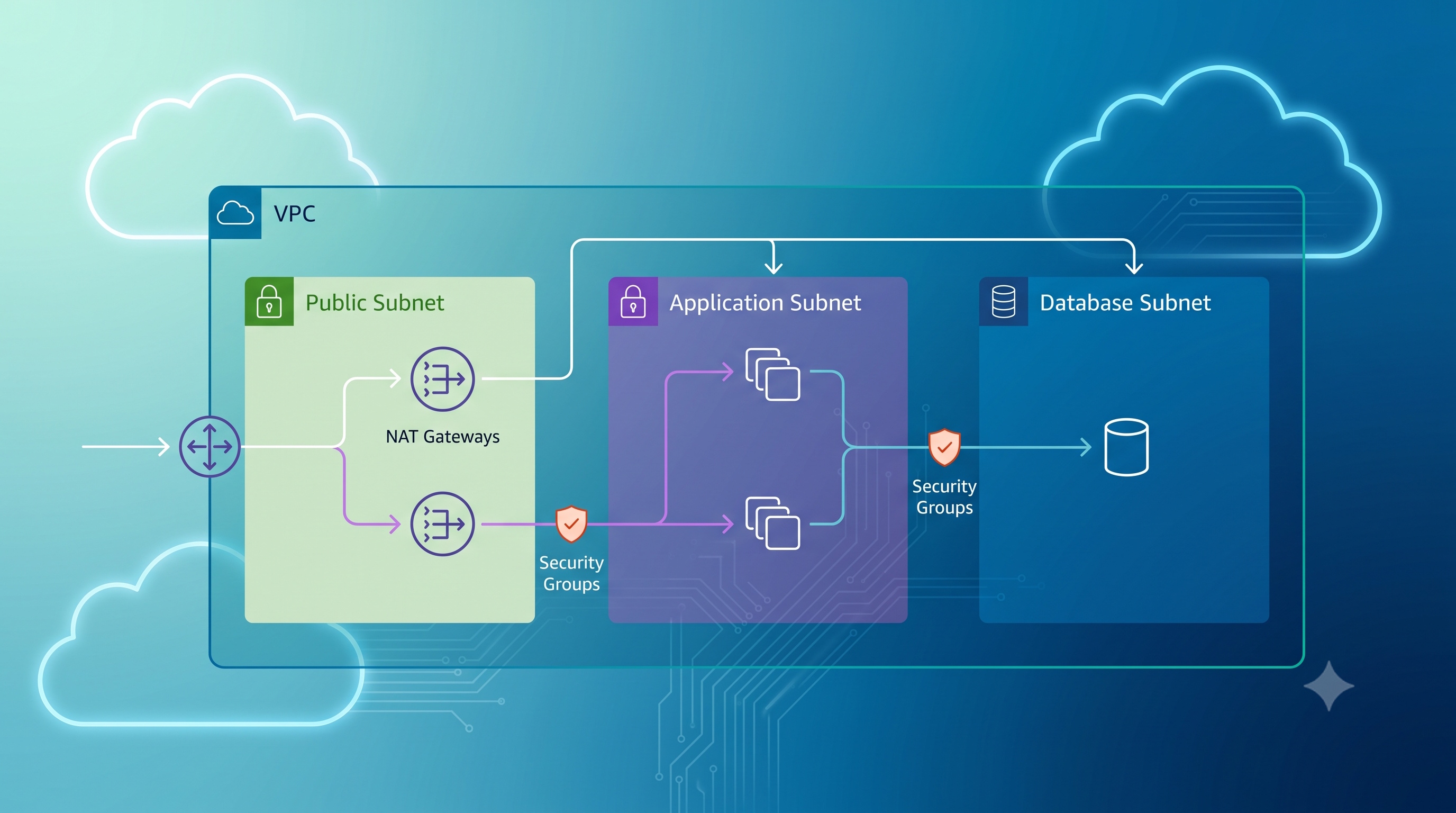
Setting up a VPC for network isolation is a disciplined process that blends careful planning with precise execution. By defining clear isolation goals, selecting a robust IP scheme, and applying layered security controls, organizations can protect their most valuable workloads while retaining the agility of cloud environments. Ongoing monitoring, regular audits, and adherence to best practices ensure that the isolation remains effective as the infrastructure evolves.
Introduction
Virtual Private Clouds (VPCs) are the backbone of modern cloud networking. They allow organizations to define isolated network segments within a public cloud, providing full control over IP address ranges, routing, and security policies. Properly configured VPCs protect sensitive workloads, limit lateral movement, and simplify compliance reporting. This article provides a step-by-step guide for designing and implementing a VPC that ensures strong network isolation while remaining flexible for future growth.
Understanding VPC Fundamentals
What Is a VPC?
A VPC is a logically isolated section of a cloud provider’s network. Within a VPC you can launch compute resources, attach storage, and configure networking components such as subnets, route tables, and gateways. Isolation is achieved through separate address spaces and controlled traffic flows.
Core Components
- Subnets: Divide the VPC address range into smaller blocks. Public subnets host resources requiring internet access, while private subnets host internal services.
- Route Tables: Define traffic flow between subnets, the internet, and other networks.
- Internet Gateway (IGW): Provides outbound internet connectivity for public subnets.
- NAT Gateway or NAT Instance: Enables outbound internet access for private subnets without direct exposure.
- Security Groups: Stateful firewalls attached to instances.
- Network ACLs: Stateless firewalls applied at the subnet level.
Understanding how these pieces interact is essential before beginning the isolation design.
Planning Network Isolation
Define Isolation Goals
- Prevent unauthorized access from other VPCs or accounts.
- Restrict internet exposure for sensitive workloads.
- Separate development, testing, and production environments.
- Align with regulatory requirements such as PCI DSS or HIPAA.
Choose an IP Addressing Scheme
- Use non-overlapping CIDR blocks for each environment.
- Reserve space for future subnets.
- Avoid using public IP ranges that could cause routing conflicts.
Map Out Subnet Layout
- Create at least two private subnets per Availability Zone for high availability.
- Place any bastion hosts or jump boxes in dedicated public subnets.
- Isolate database tiers in separate private subnets with no direct internet route.
Document Security Controls
- List required inbound and outbound ports for each tier.
- Identify resources that need to communicate across VPCs via VPC peering or Transit Gateway.
- Record compliance checkpoints for audit trails.
Step‑by‑Step Configuration
1. Create the VPC
- Open the cloud console and select “Create VPC.”
- Enter a descriptive name and a CIDR block (e.g., 10.0.0.0/16).
- Enable DNS hostnames if required for internal resolution.
2. Set Up Subnets
- Create public subnets in each availability zone (e.g., 10.0.0.0/24, 10.0.2.0/24).
- Create private subnets for application and database layers (e.g., 10.0.4.0/22, 10.0.8.0/22).
- Assign appropriate subnet names to simplify management.
3. Attach an Internet Gateway
- Allocate an IGW to the VPC.
- Update the route table for public subnets to route 0.0.0.0/0 to the IGW.
4. Deploy NAT Gateway(s)
- Provision a NAT Gateway in each public subnet.
- Associate private subnet route tables with the NAT Gateway for outbound internet traffic.
5. Configure Route Tables
- Create a default route table for public subnets (includes IGW route).
- Create separate route tables for each private subnet group (includes NAT route).
- Associate each subnet with its corresponding route table.
6. Define Security Groups
- Create a security group for web servers: allow inbound HTTP/HTTPS from the internet, allow outbound to the application tier.
- Create a security group for application servers: allow inbound from web tier, allow outbound to database tier and internet via NAT.
- Create a security group for databases: allow inbound only from the application tier, deny all outbound internet traffic.
7. Set Up Network ACLs (Optional)
- Apply a deny-all inbound rule for the default ACL on private subnets.
- Add explicit allow rules for required ports between tiers.
- Ensure stateless nature is accounted for by adding corresponding outbound rules.
8. Enable Flow Logs
- Activate VPC Flow Logs to capture traffic metadata.
- Store logs in a secure storage bucket for analysis and compliance.
9. Test Isolation
- Launch a test instance in each subnet.
- Verify that public instances can reach the internet, private instances cannot.
- Confirm that database instances reject connections from outside the application tier.
10. Document and Tag Resources
- Apply consistent tags (e.g., Environment:Production, Owner:TeamA).
- Record architecture diagrams and configuration details in a version-controlled repository.
Security Best Practices
- Least Privilege: Grant only the ports and protocols required for each tier.
- Zero Trust Segmentation: Treat every subnet as untrusted; enforce strict ACLs and security groups.
- Encryption in Transit: Use TLS for all internal communications.
- Patch Management: Keep operating systems and middleware up to date.
- Regular Audits: Review security group rules and flow logs weekly.
- Multi-Factor Authentication: Require MFA for all administrative access to the VPC.
Monitoring and Maintenance
- Automated Alerts: Configure CloudWatch or equivalent to trigger alerts on suspicious traffic patterns.
- Periodic Penetration Testing: Conduct internal scans to validate isolation.
- Capacity Planning: Monitor subnet IP utilization to avoid exhaustion.
- Backup Strategies: Ensure critical configurations, such as route tables and security groups, are backed up using infrastructure-as-code tools.
Conclusion
Setting up a VPC for network isolation is a disciplined process that blends careful planning with precise execution. By defining clear isolation goals, selecting a robust IP scheme, and applying layered security controls, organizations can protect their most valuable workloads while retaining the agility of cloud environments. Ongoing monitoring, regular audits, and adherence to best practices ensure that the isolation remains effective as the infrastructure evolves.