

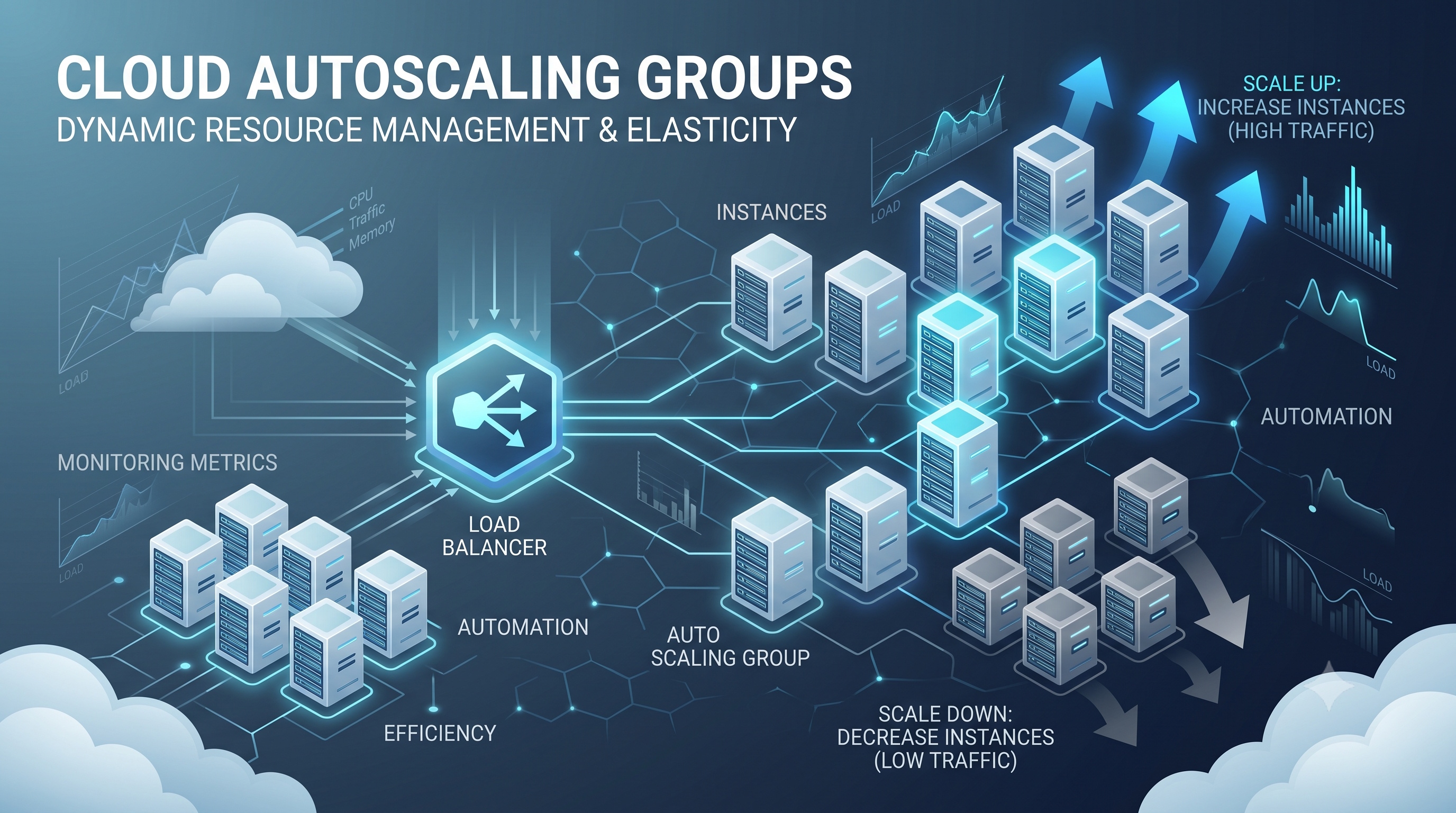
Autoscaling groups are a foundational component of resilient, cost‑effective cloud architectures. By automating the provisioning and decommissioning of compute resources, they enable organizations to deliver consistent performance while adhering to budgetary constraints. Successful implementation relies on well‑defined launch configurations, thoughtful scaling policies, and continuous monitoring. When applied correctly, autoscaling groups transform capacity management from a reactive task into a proactive, self‑optimizing system that scales with business needs.
Introduction
Modern cloud environments demand flexibility, cost efficiency, and reliability. An autoscaling group (ASG) provides a systematic way to match compute capacity with workload demand without manual intervention. By automatically adding or removing virtual machines, containers, or instances, an ASG helps organizations maintain performance during traffic spikes while reducing expenses during idle periods. This article explores the architecture, operation, benefits, typical use cases, and best-practice guidelines for implementing autoscaling groups in cloud platforms such as Amazon Web Services (AWS), Microsoft Azure, and Google Cloud Platform (GCP).
What Is an Autoscaling Group?
An autoscaling group is a logical collection of compute resources that share a common configuration and scaling policy. The group monitors defined metrics and adjusts the number of active members to keep the system within target performance thresholds. The key idea is that the group itself, not individual instances, becomes the unit of management for capacity planning.
Core Components
- Launch Template or Configuration : Describes the instance type, operating system, networking, and startup scripts that each new member will use.
- Desired Capacity : The target number of instances the group aims to maintain after scaling actions.
- Minimum and Maximum Size : Bounds that prevent the group from scaling below a safe baseline or exceeding budgeted limits.
- Health Checks : Mechanisms that verify whether an instance is operating correctly; unhealthy members are terminated and replaced.
- Scaling Policies : Rules that define when and how the group should increase or decrease capacity based on metric thresholds.
How Autoscaling Works
Autoscaling follows a closed loop: monitoring, evaluation, action, verification. The loop runs continuously, allowing the group to respond to real-time changes in demand.
Scaling Policies
- Target Tracking : Maintains a metric (for example, CPU utilization) at a predefined percentage by adding or removing capacity as needed.
- Step Scaling : Executes a specific adjustment (such as adding two instances) when a metric crosses a defined threshold, with optional larger steps for higher deviations.
- Scheduled Scaling : Applies predetermined capacity changes at specific times, useful for predictable traffic patterns like business hours or nightly batch jobs.
Metrics and Triggers
- CPU Utilization : Commonly used to gauge processing load; high values trigger scale‑out, low values trigger scale‑in.
- Network Throughput : Measures inbound or outbound traffic; spikes may indicate the need for additional bandwidth.
- Request Count per Target : In load‑balanced environments, the number of requests per server helps maintain even distribution.
- Custom Application Metrics : Application‑specific counters such as queue depth, latency, or error rate provide finer‑grained control.
When a metric exceeds its upper threshold, the ASG initiates a scale‑out event: it launches new instances using the launch template, registers them with load balancers, and waits for health checks to pass. Conversely, when a metric falls below its lower threshold, the ASG selects one or more healthy instances for termination, ensuring that traffic is gracefully drained before removal.
Benefits of Using Autoscaling Groups
- Cost Optimization : Resources are provisioned only when needed, reducing idle compute spend.
- Improved Availability : Automatic replacement of unhealthy instances maintains service continuity.
- Performance Consistency : Scaling actions keep response times within acceptable limits during demand fluctuations.
- Operational Simplicity : Reduces the need for manual capacity planning and emergency interventions.
- Compliance and Governance : Enforces minimum and maximum capacity constraints, aligning with budgetary policies.
Common Use Cases
- Web Applications : Front‑end servers behind a load balancer scale with user traffic.
- Batch Processing : Workers increase during scheduled data pipelines and shrink afterward.
- Microservices : Containerized services adjust replica counts based on request rates.
- Gaming Servers : Multiplayer sessions trigger rapid scaling to accommodate peak player counts.
- IoT Data Ingestion : Edge gateways expand to handle bursts of sensor data.
Best Practices for Configuring Autoscaling Groups
- Define Accurate Baselines : Use historical monitoring data to set realistic minimum, maximum, and target values.
- Leverage Multiple Metrics : Combine CPU, memory, and custom application metrics to avoid scaling on a single noisy signal.
- Implement Cool‑down Periods : Introduce short delays after a scaling action to prevent rapid oscillations.
- Use Health Check Grace Periods : Allow new instances sufficient time to initialize before health checks evaluate them.
- Integrate with Load Balancers : Ensure that newly launched instances are automatically added to traffic distribution pools.
- Tag Resources : Apply consistent tagging for cost allocation, monitoring, and automated cleanup.
- Test Scaling Scenarios : Simulate load spikes in a staging environment to verify policy effectiveness and response times.
- Monitor Scaling Events : Enable logging of scaling activities to audit behavior and refine policies.
Monitoring and Troubleshooting
- Event Logs : Review autoscaling event logs to confirm that actions correspond to expected metric thresholds.
- Metric Dashboards : Visualize key performance indicators alongside scaling activity to spot correlations.
- Alarm Configuration : Set up alerts for failed health checks, prolonged scaling delays, or capacity limits being reached.
- Instance Diagnostics : Examine startup scripts and configuration drift when new instances repeatedly fail health checks.
- Capacity Planning Reviews : Periodically reassess maximum limits to accommodate growth and avoid throttling.
Conclusion
Autoscaling groups are a foundational component of resilient, cost‑effective cloud architectures. By automating the provisioning and decommissioning of compute resources, they enable organizations to deliver consistent performance while adhering to budgetary constraints. Successful implementation relies on well‑defined launch configurations, thoughtful scaling policies, and continuous monitoring. When applied correctly, autoscaling groups transform capacity management from a reactive task into a proactive, self‑optimizing system that scales with business needs.