

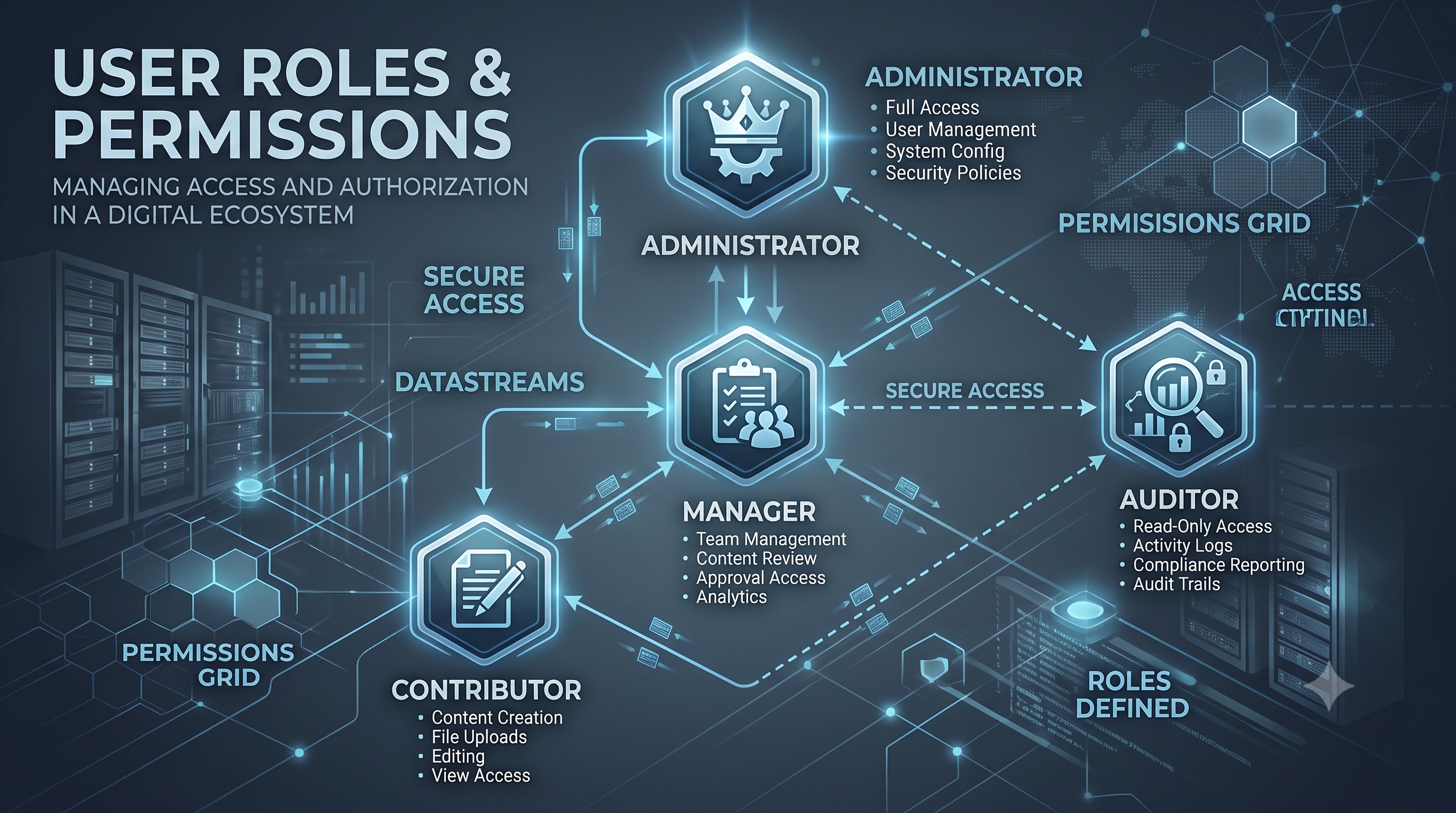
Configuring user roles and permissions is a strategic process that improves security, efficiency, and compliance. By defining roles based on business functions and using platform features, organizations can build a reliable access control model. Consistent management through audits, automation, and monitoring ensures that the framework meets changing needs. These practices help protect important data while allowing users to work effectively.
Introduction
Efficiently managing user roles and permissions is vital for maintaining secure and functional information systems. Whether used for a corporate intranet, a cloud-based SaaS platform, or a custom application, clearly defining user access helps reduce data breach risks, simplifies workflows, and ensures regulatory compliance. This guide supports administrators, security architects, and developers in designing and maintaining reliable role-based access control (RBAC) structures. It covers basic concepts, practical design steps, platform-specific details, and management practices.
Understanding the Fundamentals
What Is Role-Based Access Control?
Role-based access control assigns permissions to roles instead of individual users. A role represents a group of duties with shared access rights. Users are linked to one or more roles and automatically receive the associated permissions. This approach simplifies administration, particularly in large organizations with frequent personnel changes.
Core Components
- Roles – Logical groupings of responsibilities (e.g., Administrator, Editor, Viewer).
- Permissions – Specific actions that can be performed on resources (e.g., read, write, delete).
- Resources – Objects or services that require protection (e.g., files, database tables, API endpoints).
- Assignments – The relationship that binds users to roles.
Benefits of RBAC
- Scalability – Adding a new user requires only a role assignment, not individual permission entries.
- Consistency – Uniform permission sets across similar job functions reduce configuration errors.
- Auditability – Role-to-permission mappings are easier to review during compliance checks.
- Separation of Duties – Conflicting responsibilities can be isolated by assigning mutually exclusive roles.
Designing a Role Hierarchy
A well-structured hierarchy balances specific control with ease of management. Overly detailed roles increase administrative work, while roles that are too broad may provide too much access.
Step-by-Step Design Process
1. Identify Business Functions
List all functional areas within the organization (e.g., finance, human resources, product development).
2. Map Tasks to Permissions
For each function, enumerate the tasks users perform and the corresponding system actions required.
3. Group Tasks Into Roles
Combine related tasks into logical roles. Create roles that match actual job titles or responsibilities.
4. Define Role Hierarchies
Establish parent-child relationships where higher-level roles inherit permissions from lower-level ones. For example, a Senior Manager role might inherit all permissions from a Manager role plus additional strategic rights.
5. Validate Separation of Duties
Use conflict matrices to ensure that no single role can perform mutually exclusive actions (e.g., creating and approving financial transactions).
6. Document and Review
Record role definitions, permission sets, and justification for each assignment. Conduct periodic reviews with stakeholders.
Example Role Structure (Bullet List)
- Global Administrator – Unrestricted access to all system settings and data.
- Department Manager – Access to departmental reports, user management within the department, and budget modification.
- Team Lead – Permission to create and edit project artifacts, assign tasks, and view team performance metrics.
- Contributor – Ability to submit work items, comment on discussions, and access shared resources.
- Auditor – Read‑only access to logs, compliance reports, and configuration snapshots.
Implementing Permissions in Common Platforms
Different platforms provide distinct mechanisms for defining roles and permissions. Below are concise implementation outlines for three widely used environments.
1. Microsoft Azure Active Directory (Azure AD)
- Create Custom Roles – Use the Azure portal or PowerShell to define role definitions with JSON permission sets.
- Assign Roles – Bind users, groups, or service principals to custom roles at the subscription, resource group, or resource level.
- Conditional Access – Combine role assignments with policies that require multi-factor authentication or device compliance.
2. Amazon Web Services (AWS) Identity and Access Management (IAM)
- Policy Documents – Write JSON policies that specify `Effect`, `Action`, and `Resource` elements.
- IAM Roles – Create roles that trust specific entities (users, services, or external accounts) and attach policies.
- Permission Boundaries – Use boundaries to limit the maximum permissions a role can obtain, adding an extra safeguard.
3. PostgreSQL Database
- Roles and Groups – Create database roles with `CREATE ROLE` and assign them to groups using `GRANT`.
- Schema‑Level Privileges – Grant `SELECT`, `INSERT`, `UPDATE`, or `DELETE` on specific schemas or tables.
- Row-Level Security – Enable policies that filter rows based on the current role, providing specific control without creating too many roles.
Best Practices for Ongoing Management
Maintaining a secure RBAC system requires continuous attention. The following practices help keep the configuration aligned with business needs and emerging threats.
Regular Audits
- Review role-to-permission mappings every quarter.
- Check usage logs against assigned permissions to find roles with excessive access.
- Document audit findings and remediate unnecessary access promptly.
Least Privilege Principle
- Start with the minimal set of permissions required for a role.
- Add additional rights only after a documented justification and approval process.
Automated Provisioning
- Integrate role assignments with HR systems to automate onboarding and offboarding.
- Use identity governance tools that trigger role changes based on employment status or department transfers.
Change Management
- Require peer review and managerial approval for any modification to role definitions.
- Maintain version control of role definition files (e.g., JSON, YAML) in a secure repository.
Monitoring and Alerting
- Set up real-time alerts for when privileged roles are used outside of regular business hours.
- Correlate access events with security information and event management (SIEM) platforms to detect anomalous behavior.
Conclusion
Configuring user roles and permissions is a strategic process that improves security, efficiency, and compliance. By defining roles based on business functions and using platform features, organizations can build a reliable access control model. Consistent management through audits, automation, and monitoring ensures that the framework meets changing needs. These practices help protect important data while allowing users to work effectively.