

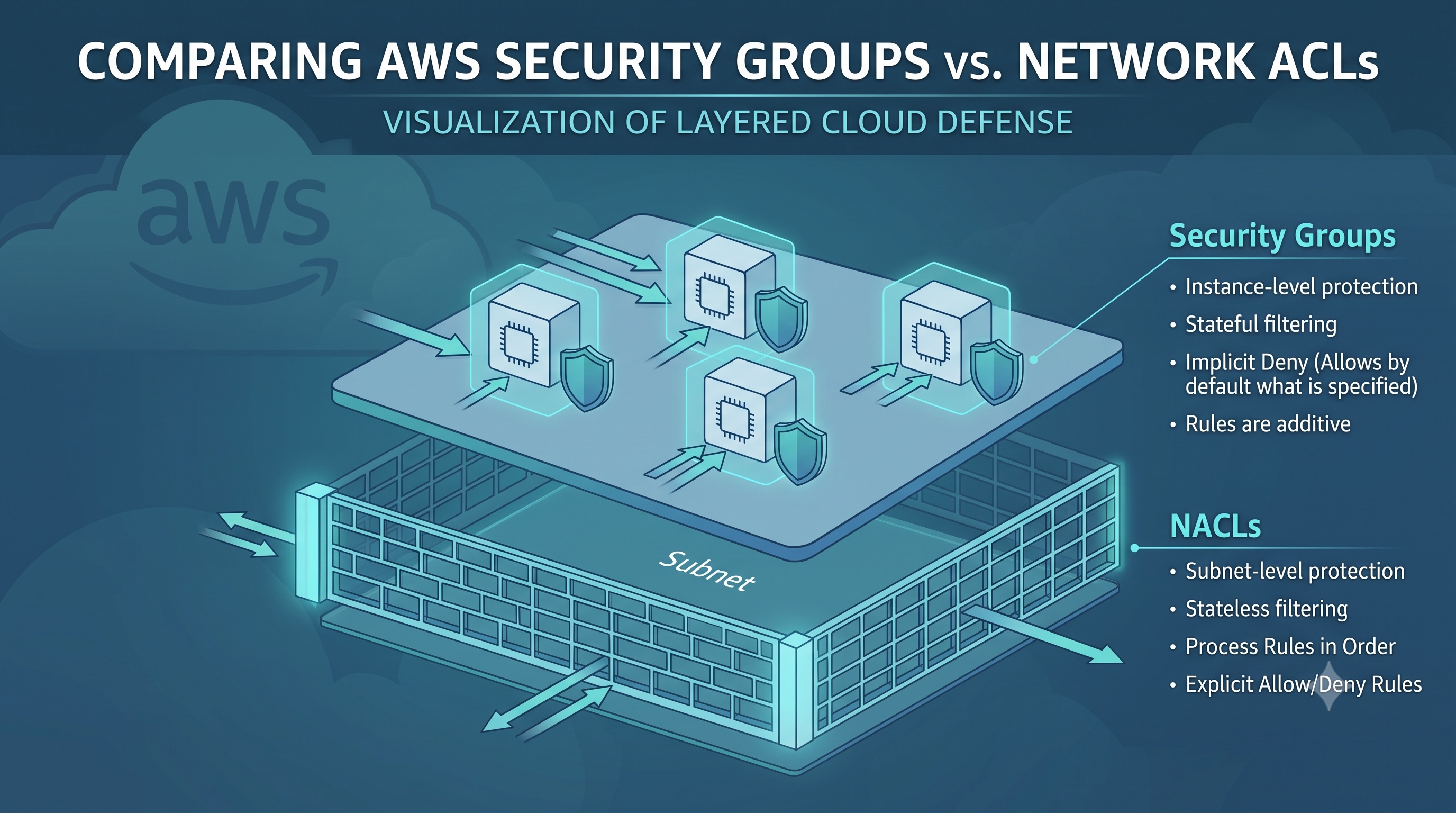
AWS Security Groups and Network ACLs are complementary tools that address security at different layers of the VPC architecture. Security Groups excel at fine-grained, stateful control of individual workloads, while NACLs offer stateless, subnet-wide filtering with explicit deny capabilities. By applying a layered approach, using NACLs for baseline protection and Security Groups for application-specific rules, organizations can achieve a robust security posture that balances flexibility with strict access control. Consistent tagging, infrastructure-as-code management, and continuous monitoring further enhance the effectiveness of these controls and support compliance initiatives across dynamic cloud environments.
Introduction
When designing a secure Amazon Web Services (AWS) environment, two network-level controls dominate the conversation: Security Groups and Network Access Control Lists (NACLs). Both serve to filter traffic, yet they operate at different layers, have distinct rule evaluation models, and address separate use cases. Understanding their similarities and differences is essential for architects, engineers, and security professionals who need to protect workloads while maintaining operational flexibility. This article provides a detailed comparison, highlights practical scenarios, and outlines best practices for deploying these controls together.
What Is an AWS Security Group?
Security Groups act as virtual firewalls for Amazon Elastic Compute Cloud (EC2) instances, containers, and other resources that support the Elastic Network Interface (ENI). They are stateful, meaning that return traffic is automatically allowed once an inbound rule permits the initial request.
Core Characteristics
- Scope - Applied at the ENI level; a single instance can belong to multiple groups.
- Direction - Separate inbound and outbound rule sets.
- Statefulness - Return traffic is permitted without an explicit rule.
- Rule Type - Supports allow rules only; there is no deny capability.
- Evaluation - All rules are evaluated together; if any rule matches, traffic is allowed.
- Default Behavior - By default, inbound traffic is denied and outbound traffic is allowed.
Security Groups are ideal for defining the expected communication pattern of a workload. For example, a web server might allow inbound HTTP (port 80) and HTTPS (port 443) from the internet, while permitting outbound traffic to a database on port 3306 only from the web tier.
What Is an AWS Network ACL?
Network ACLs operate at the subnet level within a Virtual Private Cloud (VPC). They are stateless, which requires explicit rules for both inbound and outbound traffic. Each subnet can be associated with only one NACL, but a single NACL can be shared across multiple subnets.
Core Characteristics
- Scope - Applied to an entire subnet; all resources in the subnet inherit the NACL rules.
- Direction - Separate inbound and outbound rule sets, each evaluated independently.
- Statelessness - Return traffic must be explicitly allowed by a rule.
- Rule Type - Supports both allow and deny rules.
- Evaluation Order - Rules are processed in numeric order, starting at the lowest number. The first matching rule determines the action.
- Default Behavior - The default NACL allows all inbound and outbound traffic.
NACLs are useful for implementing broad security boundaries, such as blocking traffic from known malicious IP ranges across an entire subnet, or enforcing compliance requirements that apply uniformly to a set of resources.
Key Differences
- Level of Application - Security Groups protect individual ENIs, while NACLs protect entire subnets.
- Statefulness - Security Groups are stateful; NACLs are stateless.
- Rule Types - Security Groups allow only permit rules; NACLs allow both permit and deny rules.
- Evaluation Model - Security Groups evaluate all rules simultaneously; NACLs evaluate rules sequentially based on rule number.
- Default Posture - Security Groups start with a deny-all inbound posture; NACLs start with an allow-all posture.
- Granularity - Security Groups provide fine-grained control per instance; NACLs provide coarse-grained control per subnet.
These differences translate into distinct operational considerations. Security Groups simplify the management of workload‑specific traffic patterns, whereas NACLs provide a safety net for subnet‑wide policies that must be enforced regardless of individual instance configurations.
Best Practices for Using Security Groups and NACLs Together
- Layered Defense - Deploy NACLs to enforce baseline subnet security (for example, blocking known bad IP ranges) and use Security Groups to define precise application-level access.
- Least Privilege - Start with deny-all inbound rules in Security Groups and add only the ports and sources required for the workload.
- Avoid Redundant Deny Rules - Since Security Groups cannot deny traffic, use NACLs to block unwanted traffic that would otherwise be allowed by default.
- Consistent Tagging - Tag both Security Groups and NACLs with purpose, owner, and environment metadata to simplify audits and automation.
- Monitor and Log - Enable VPC Flow Logs for both Security Group and NACL traffic to gain visibility into allowed and denied connections.
- Version Control - Store rule definitions in infrastructure-as-code templates (such as AWS CloudFormation or Terraform) to track changes and enable reproducible deployments.
Common Misconceptions
- "Security Groups replace NACLs." - While Security Groups cover many use cases, NACLs still play a critical role in protecting against subnet-wide threats and providing explicit deny capabilities.
- "NACLs are slower because they are stateless." - Both controls are processed at the hypervisor level and have negligible performance impact for typical workloads.
- "A single Security Group can protect an entire VPC." - Security Groups are attached to ENIs; they do not apply to resources that lack an ENI, such as AWS Lambda functions invoked via VPC endpoints.
- "Deny rules in NACLs are unnecessary if Security Groups are strict." - Deny rules can provide an additional safety net, especially when new resources are added to a subnet without updating their Security Groups.
Conclusion
AWS Security Groups and Network ACLs are complementary tools that address security at different layers of the VPC architecture. Security Groups excel at fine-grained, stateful control of individual workloads, while NACLs offer stateless, subnet-wide filtering with explicit deny capabilities. By applying a layered approach, using NACLs for baseline protection and Security Groups for application-specific rules, organizations can achieve a robust security posture that balances flexibility with strict access control. Consistent tagging, infrastructure-as-code management, and continuous monitoring further enhance the effectiveness of these controls and support compliance initiatives across dynamic cloud environments.