

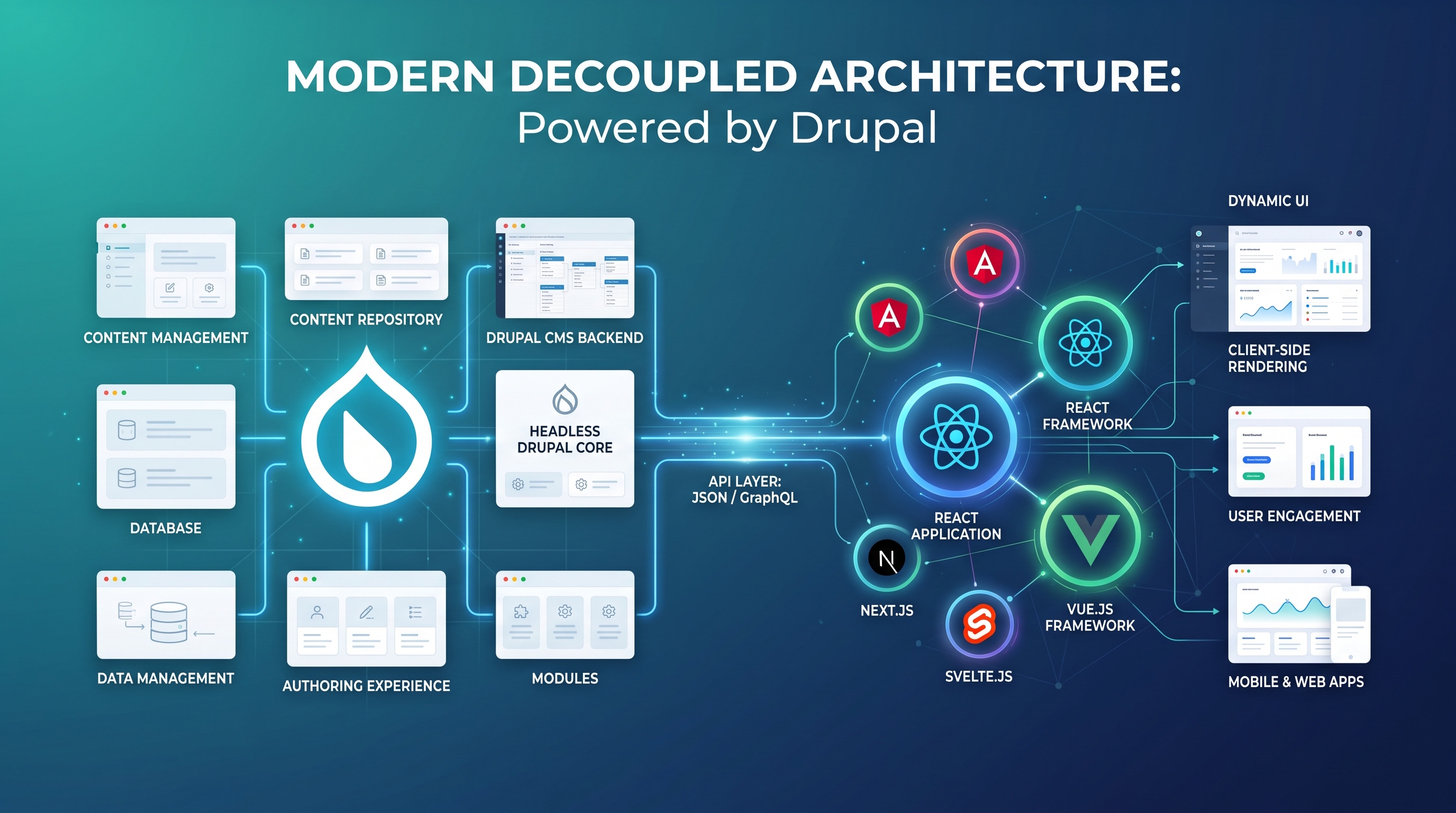
Decoupled architectures allow teams to build fast, flexible digital experiences across devices while keeping a powerful CMS back end. With native API tools, flexible content modeling, and dynamic rendering patterns, Drupal offers a clear path for headless development.
Introduction
More organizations now choose decoupled, or "headless," architectures to build modern digital experiences across multiple channels. Decoupling separates your content management backend from the front-end presentation layer. This lets developers pick the best front-end tools while keeping a flexible backend for content creators. Drupal has evolved into a powerful CMS for building these headless setups. Below is an overview of how Drupal supports decoupled architectures, the core patterns it uses, and practical tips for implementation.
Understanding Decoupled Architecture
A decoupled architecture splits an application into two main parts:
- Content repository – Storing, managing, and serving structured content.
- Presentation layer – The front-end framework or app that renders content for users.
APIs connect the two layers, delivering content to single-page JavaScript apps, mobile apps, or digital displays. By separating the front end from the back end, teams can redesign user interfaces faster without breaking underlying content, reusing the same material across many platforms.
Why Organizations Choose Decoupling
- Faster front-end development using popular JavaScript frameworks.
- Tailored experiences customized for specific devices.
- Better scalability, since front-end servers can scale separately from the CMS.
- Stronger security through isolating the public site from the main CMS host.
- Easier updates to front-end tech without needing to rewrite content.
Drupal’s Core Features for Decoupling
JSON:API
Drupal comes with full JSON:API support out of the box. It exposes all content entities as RESTful resources with built-in filtering, sorting, pagination, and relationship handling. Standardized specs keep request and response structures consistent, saving you from writing custom endpoints.
GraphQL
The GraphQL module lets clients request exact fields, shrinking payloads and speeding up low-bandwidth connections. It also allows developers to query complex relationships across multiple entities in one request, simplifying front-end data fetching.
RESTful Web Services
For projects needing traditional REST endpoints, Drupal’s RESTful Web Services module offers simple route configuration for CRUD actions. It supports JSON, XML, HAL, and other formats to integrate smoothly with existing systems.
Architectural Patterns Supported by Drupal
Headless Front-End Integration
In a fully headless setup, Drupal operates purely as a content API. Front-end frameworks like React, Vue, or Angular handle client-side rendering. Drupal’s built-in APIs and access controls ensure content is delivered safely to external apps.
Progressive Decoupling
Progressive decoupling combines traditional server rendering with targeted API calls. Drupal generates the initial page markup to keep SEO and load times strong, while dynamic components load content via JSON:API or GraphQL. It strikes a pragmatic balance between monoliths and headless systems.
Hybrid Rendering
Hybrid rendering lets different sections of your site run on different setups. A marketing microsite might be headless, while the company blog uses Drupal’s Twig templates. Drupal handles custom routing and view modes so you can configure rendering pipelines per content type.
Practical Considerations
Performance Optimization
- Cache API responses at the HTTP layer using CDNs or Varnish.
- Filter JSON:API fields to keep payloads light.
- Use entity and render caching in Drupal for popular content.
Security Implications
- Set clear permissions on API endpoints and use OAuth2 or JWT tokens for authentication.
- Apply rate limits to prevent API abuse.
- Update Drupal core and modules regularly to patch vulnerabilities.
Content Modeling Strategies
- Build reusable content types that work across multiple channels.
- Use Paragraphs or Layout Builder to design flexible nested content.
- Create distinct view modes for API output to separate internal fields from public ones.
Case Studies
- Global Retailer – Powered a React front end using Drupal’s JSON:API across web, mobile, and in-store kiosks, cutting front-end launch times by 40 percent.
- University Network – Used GraphQL to send course data and events to a student app. Targeted queries lowered average payload sizes by 30 percent, improving performance on slower networks.
- Media Publisher – Mixed server-rendered pages for SEO with headless components for interactive stories, maintaining strong search rankings alongside rich media features.
Best Practices for Implementing Decoupled Drupal
- Define clear API specs covering endpoints, auth, and data schemas from the start.
- Version your APIs to prevent breaking changes during updates.
- Use Drupal configuration management to align API settings across all environments.
- Automate testing across both the API backend and the front-end UI.
- Track API performance with monitoring tools like New Relic or Grafana and alert on latency spikes.
Future Outlook
Drupal’s roadmap keeps expanding headless support. Planned improvements focus on GraphQL federation, edge-computing support, and native content previews for decoupled setups. As tools mature, building secure, multi-channel apps with Drupal will get even simpler.
Conclusion
Decoupled architectures allow teams to build fast, flexible digital experiences across devices while keeping a powerful CMS back end. With native API tools, flexible content modeling, and dynamic rendering patterns, Drupal offers a clear path for headless development.